

Monthly maintenance prevents the broken features, security gaps, and performance issues that unpatched WordPress sites inevitably develop.
Monthly security maintenance protects WordPress sites from constant threats, since skipped updates lead to broken features, performance issues, and greater vulnerability to attacks. Greenbird Web Design delivers weekly software updates, daily security scans, and off-site backups, keeping small businesses running without technical disruption or costly downtime.
Key Takeaways
- Regular updates to WordPress core, plugins, and themes prevent security vulnerabilities and broken functionality.
- Daily backups ensure business continuity.
- Security reviews identify and eliminate gaps that expose your site to revenue-draining cyber threats.
- Performance checks maintain fast loading speeds, directly improving customer experience and search engine rankings.
Why Does Your WordPress Site Need Monthly Care?
WordPress sites require consistent attention because the platform changes constantly. Skipped updates open the door to broken features, slower performance, and greater exposure to attacks. Small organisations rarely notice the drift until a plugin conflict takes a donation page offline or a contact form stops delivering leads.
Neglect rarely announces itself early. Ignoring routine tasks leads to costly problems that catch most businesses off guard, often after the damage is already visible to customers.
What happens if WordPress maintenance is skipped?
Performance and security both decline together, not separately. Regular upkeep is essential for anyone serious about site speed, security, and search engine rankings. A site that slips on one front usually slips on all three within months.
Monthly WordPress Security Maintenance closes that gap before it widens. Our maintenance work includes:
- Weekly software updates across core, theme, and plugins
- Uptime monitoring with real-time alerts
- Daily off-site backups
- Security scans
- Transparent monthly reports summarizing activity and traffic
You'll get a dependable, documented record instead of guesswork. The site stays current, protected, and ready for whatever traffic a campaign brings.
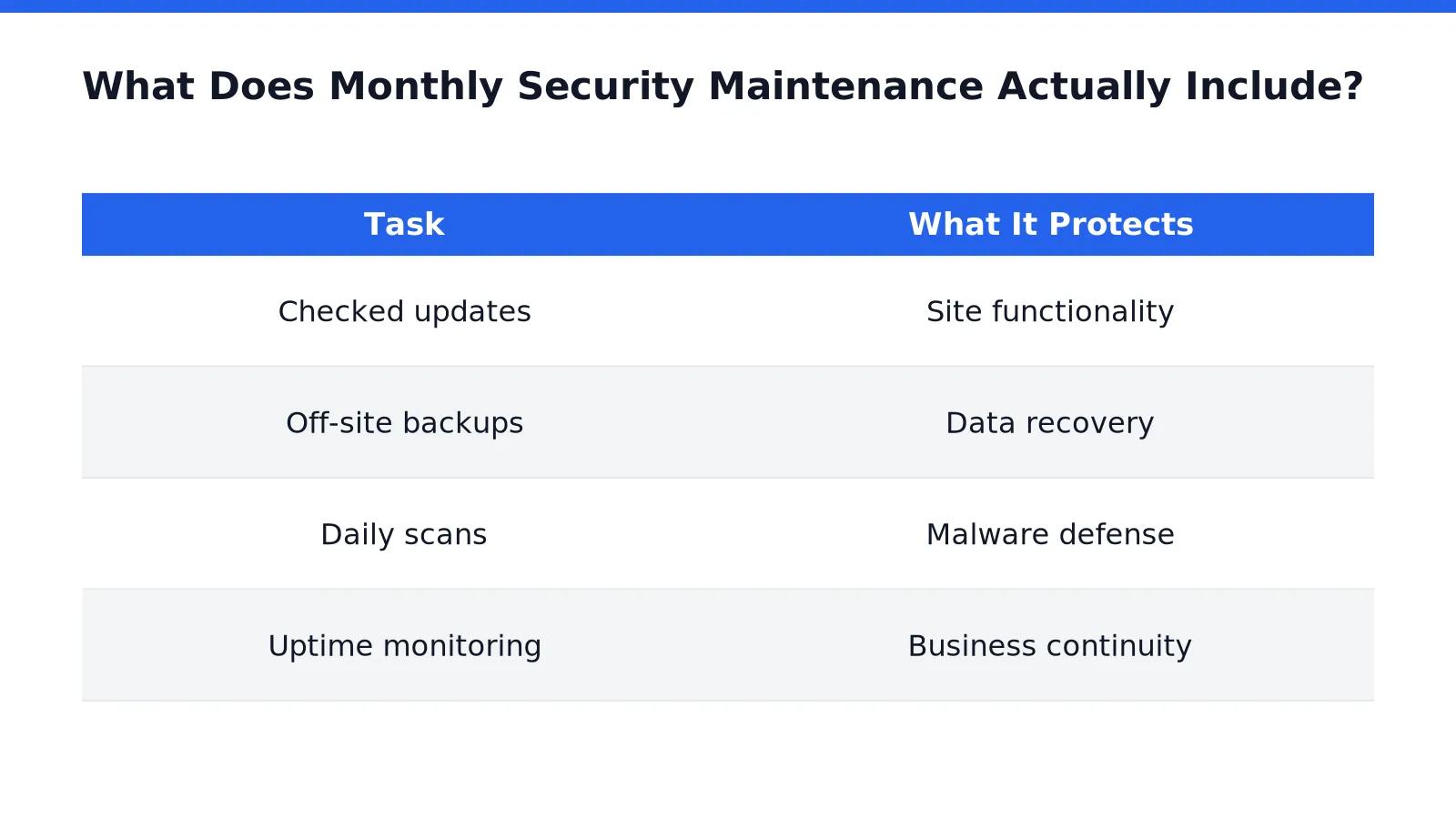
What Does Monthly Security Maintenance Actually Include?
Monthly WordPress security maintenance covers four core tasks: checked updates, off-site backups, daily scans, and uptime alerts. Skipping any one of these leaves a WordPress site exposed to downtime, data loss, or a slow, silent hack that goes unnoticed for weeks.
Updates to the WordPress core, plugins, and theme should never be run blindly on auto pilot. Each update gets checked, confirming nothing breaks in the process. A plugin update that conflicts with a theme can quietly disable a contact form or checkout page for days before anyone notices.
Backups follow a similar logic: they live apart from the hosting environment itself. If a server is compromised or simply goes offline, a site owner still has a clean copy to restore from.
Why do daily security scans matter for a small business site?
Daily scans check for malware and injected code before either one spreads. This quiet background layer catches threats early, often before a visitor or search engine ever flags a problem.
How fast will we know when and if the site goes down?
Uptime monitoring sends an alert within minutes of an outage. This means your website won't be offline until you happen to next check it. Uptime stats also give you the opportunity to evaluate if your hosting is giving you value.

FAQ
What happens if WordPress maintenance is skipped?
Skipped updates lead to broken features, slower performance, and greater exposure to attacks. Problems often go unnoticed until a plugin conflict takes a page offline or a contact form stops delivering leads.
What does monthly security maintenance actually include?
It our care plans offer a range of services to suit your needs including: software updates across core, theme, and plugins, off-site backups, security scans, uptime monitoring, and monthly reports.
Why are off-site backups important for WordPress sites?
Off-site backups live apart from the hosting environment itself. If a server is compromised or goes offline, the site owner still has a clean copy to restore from.
Conclusion
In closing, monthly security maintenance transforms WordPress from a vulnerability waiting to happen into a dependable asset for your organisation. By staying ahead of threats through consistent updates, monitoring, and backups, you protect not just your site's technical foundation but your audience's trust and your mission's credibility. The investment in proactive care pays dividends in peace of mind and sustained online presence.

0 Comments